Oscar: Water Delivery App Design in Arabic, from Case Size to the Driver at the Door
Water delivery app design for Oscar: four case sizes on one screen, cash or card, WhatsApp sign-up and a driver you can follow to the door.
The project at a glance
Oscar is a bottled-water brand by Assiqaya in Mauritania. Its customers order the same cases of water again and again, often for a household or an office, and want to know when the driver will arrive. Kenania designed the Oscar ordering app with BIGBANG IT Solutions: an Arabic, right-to-left water delivery app design of 13 screens in Adobe XD that takes a customer from choosing a case size to watching the driver approach the door.
In collaboration with

Table of Contents
Ordering water is a repeat purchase
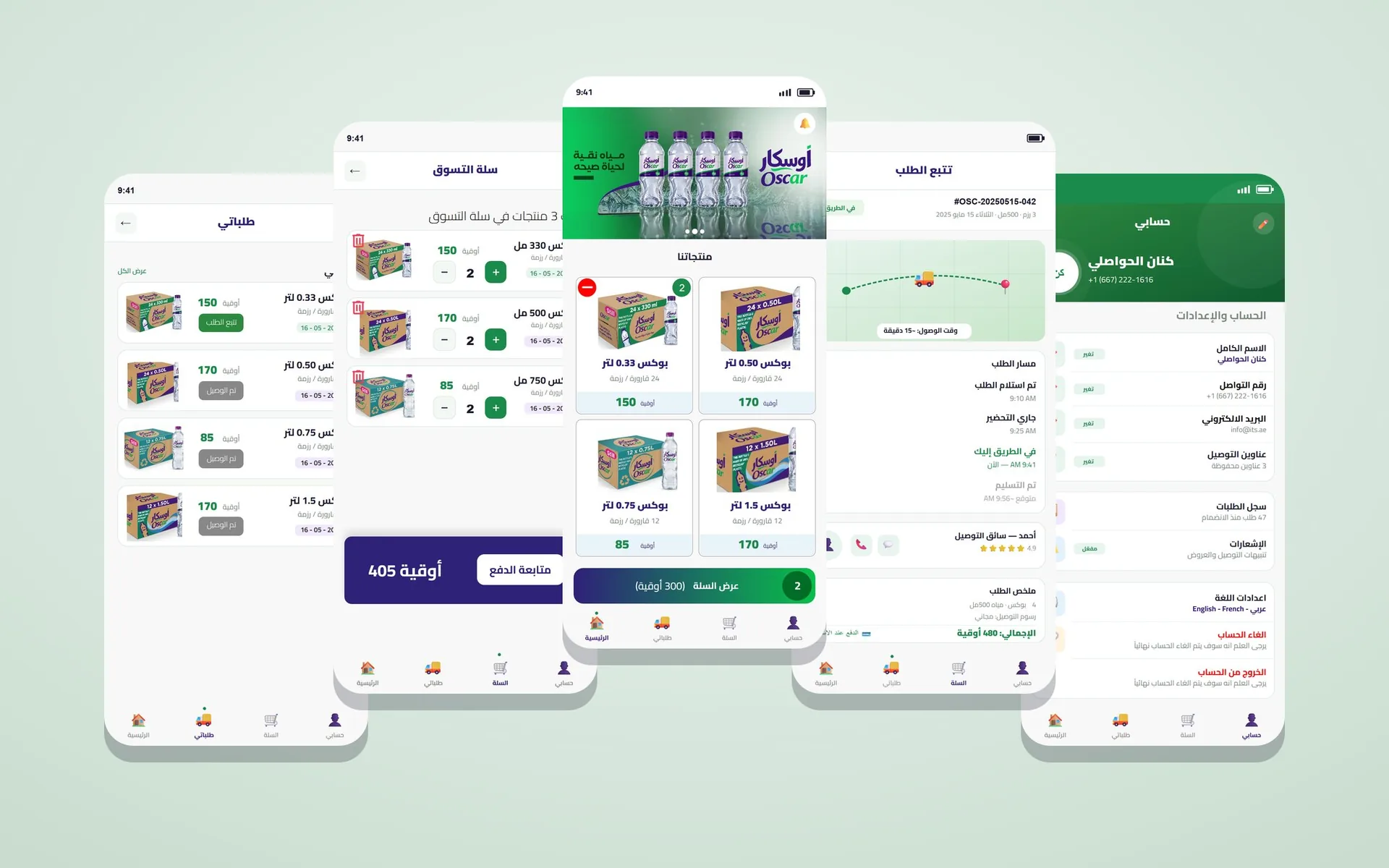
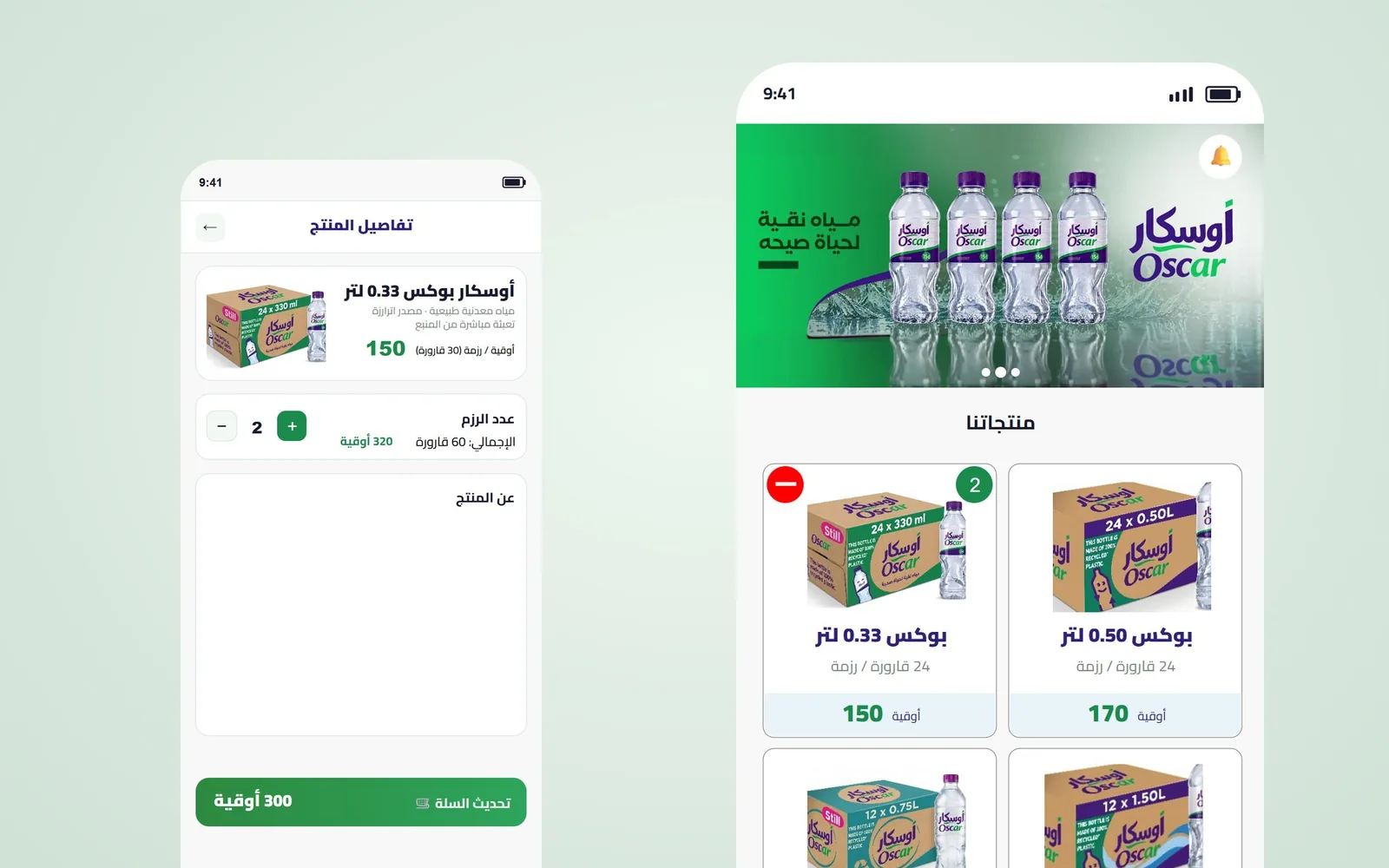
Nobody browses for water, so the water delivery app design skips the catalogue logic of a supermarket app, and the home screen shows the four products as large cards: boxes of 24 bottles of 0.33 and 0.50 litres, and boxes of 12 bottles of 0.75 and 1.5 litres, each with its price in ouguiya.
A plus and minus on the card add cases without opening another page, a badge shows how many are already in the cart, and a bar at the bottom shows the cart total in one line. A banner with the brand and its line «مياه نقية لحياة صحية» (pure water for a healthy life) is the only decoration.
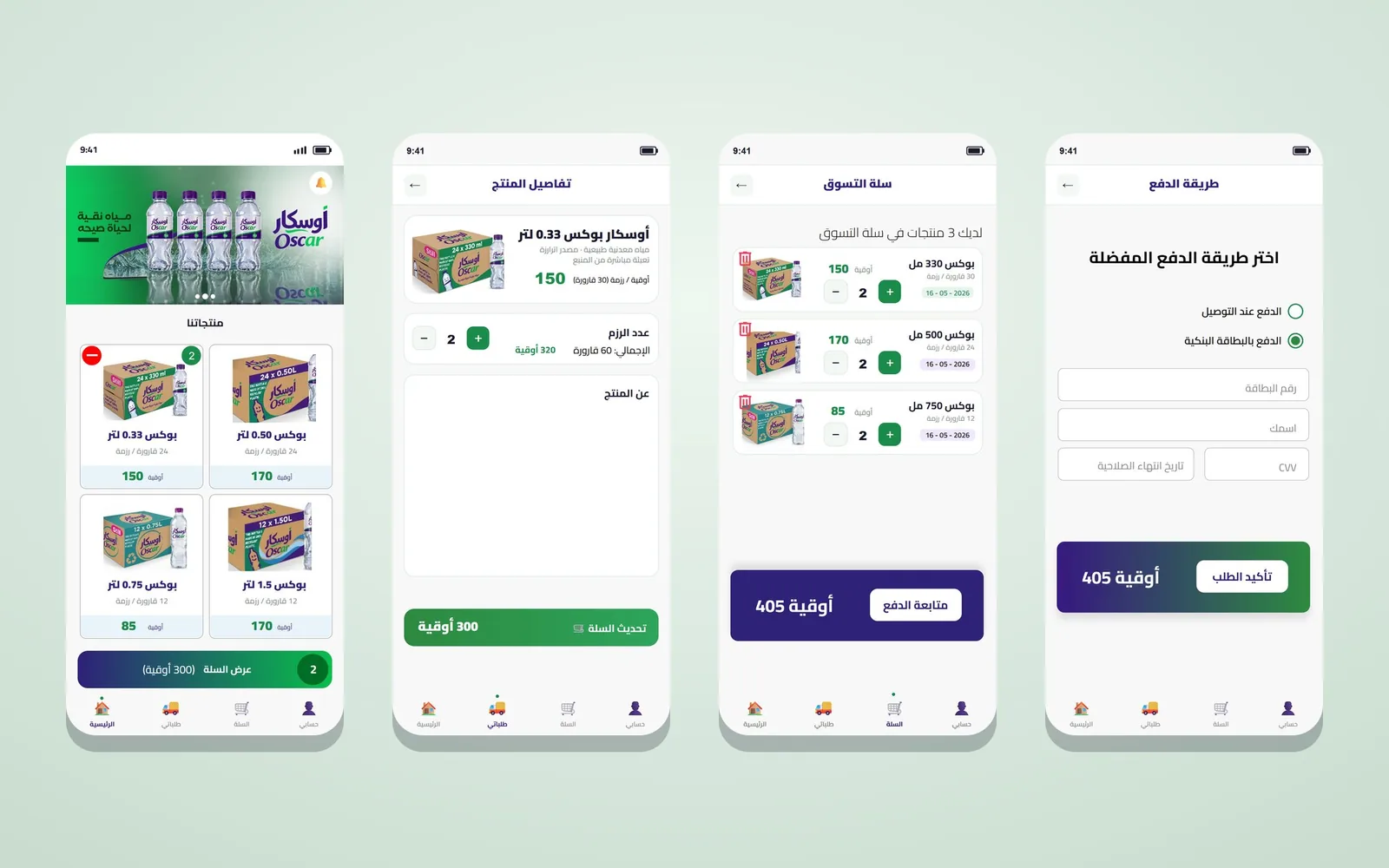
A product page is still there for customers who want details: the pack size, the number of bottles, a short description and a quantity stepper with the running total. The cart lists each case with its date and price, and a single dark bar shows the total and the button to continue to payment.
Have a project like this in mind? Message Kenania directly on WhatsApp.
Chat on WhatsAppCash on delivery or card
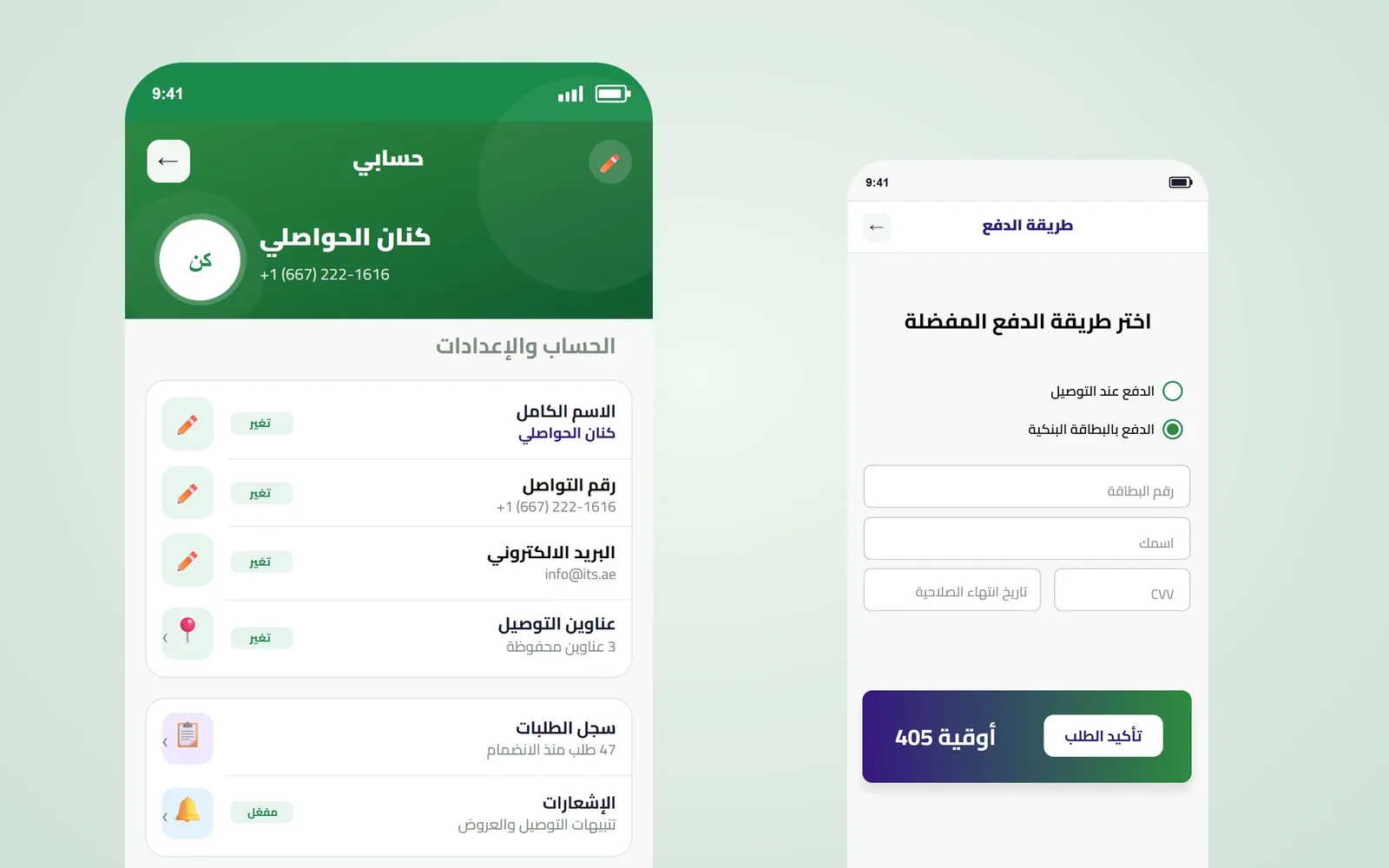
Many customers still pay the driver in cash, so the payment screen offers two choices side by side, cash on delivery and bank card, and shows card fields only when the card is chosen. The order total stays on screen all the way to the confirmation, and a success screen says the payment went through and offers a single action, track the order.
Live tracking with a name and a phone number
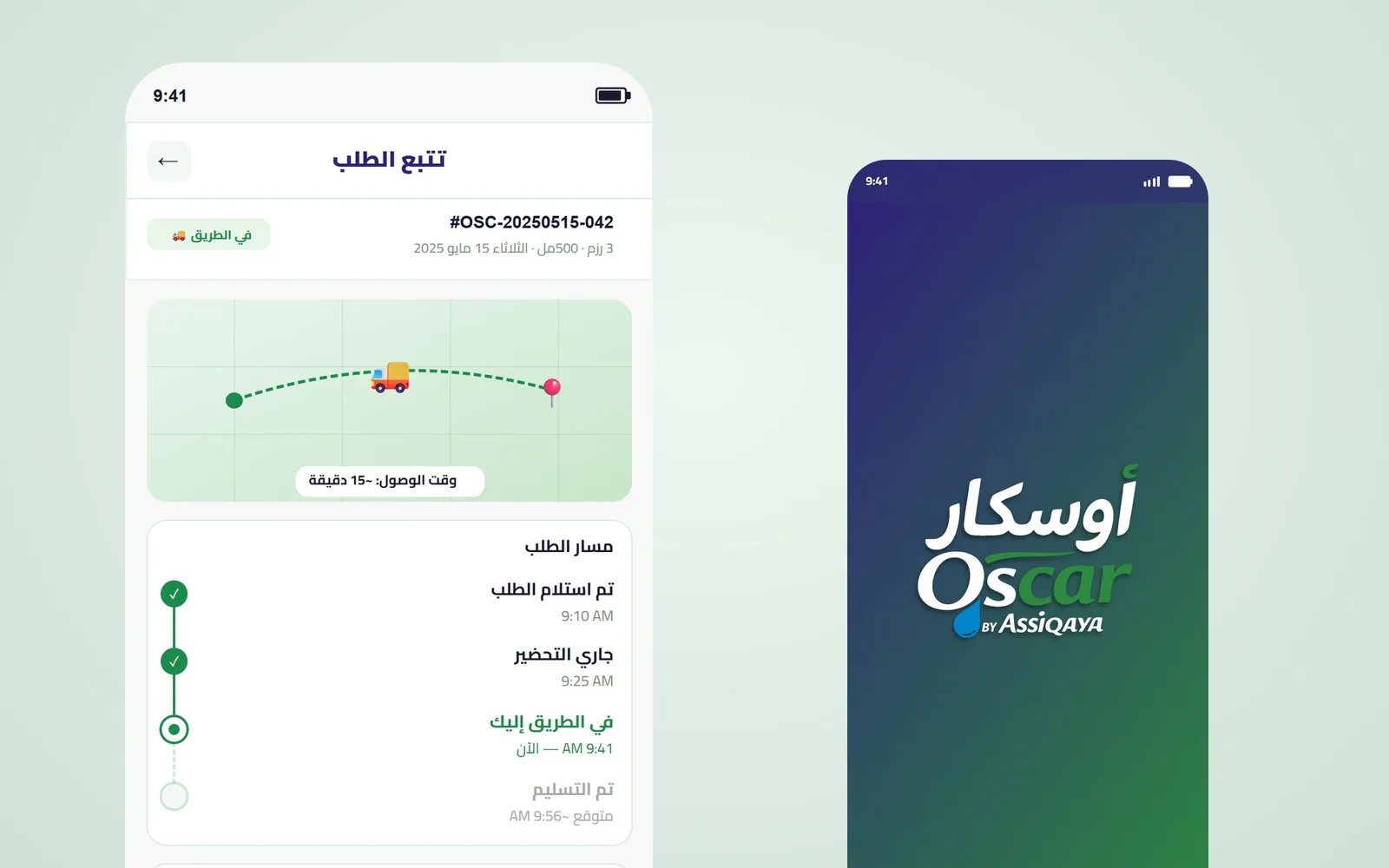
After payment the customer wants to know when the water will arrive. The tracking screen answers that at the top with a status chip and an estimated arrival in minutes over a simple map, then shows the order’s path as a timeline: order received, being prepared, on its way and delivered, each with its time. Below it the driver appears by name with a rating and two buttons, call and message, and the order summary lists the cases, the delivery fee and the total. This is the screen a customer will come back to while waiting.
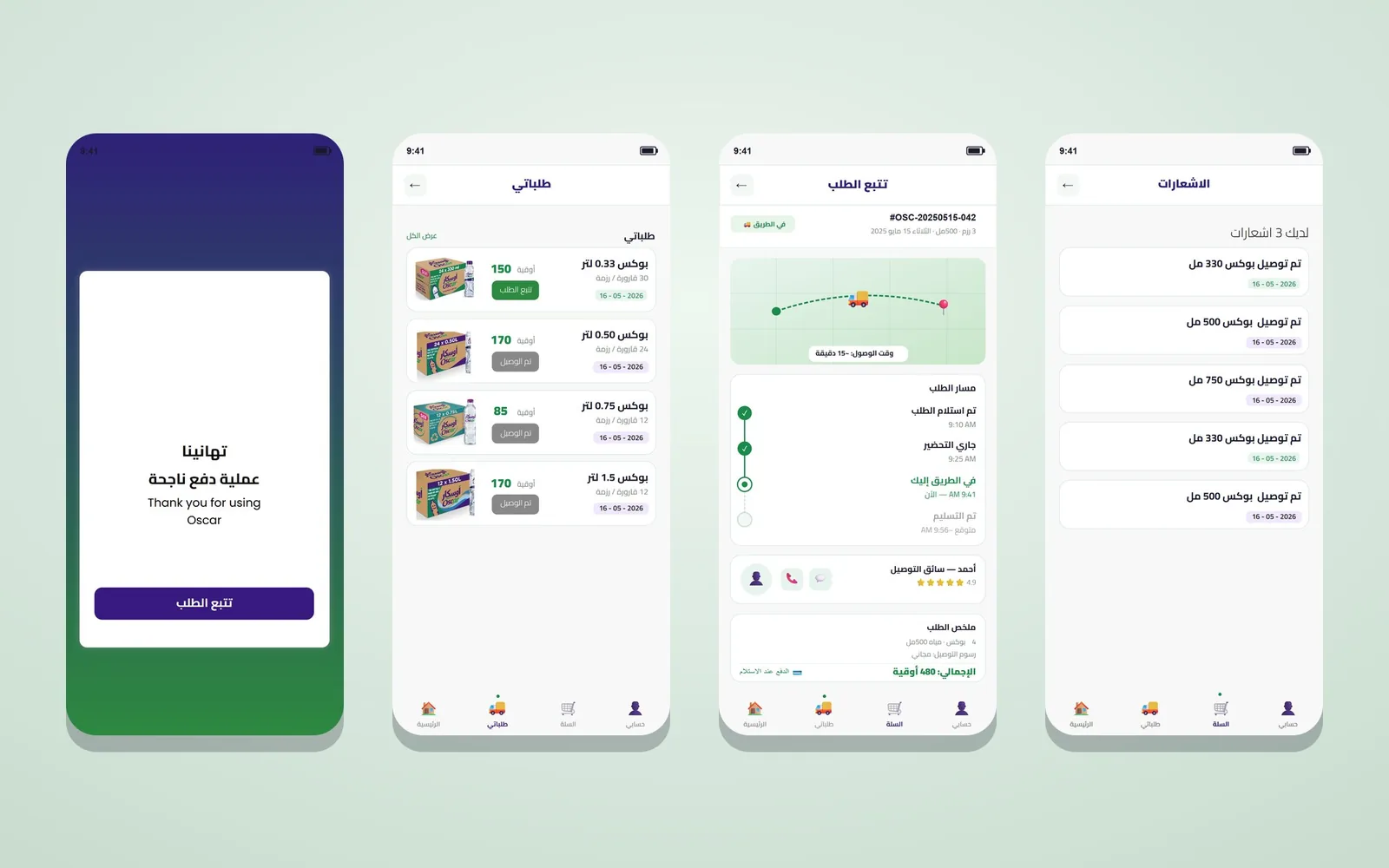
My Orders keeps every order with its status, so a customer can reorder a past one in a tap, and the notifications screen confirms each delivery as it happens.
Sign up with a WhatsApp number
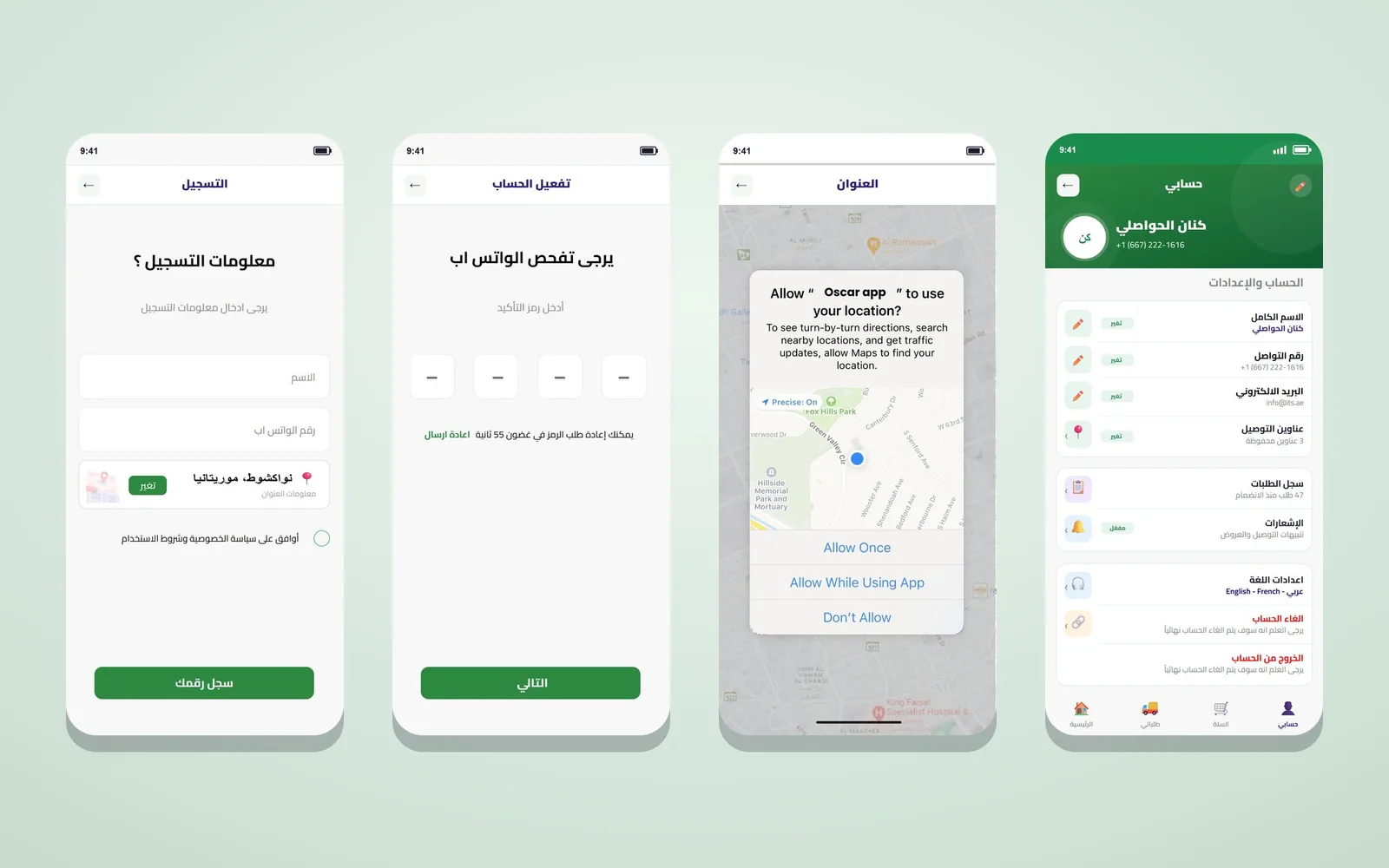
Registration asks for a name, a WhatsApp number and a delivery address picked on the map, with a box to accept the privacy policy and the terms. The code arrives on WhatsApp instead of by SMS, because that is the app people already use, and the verification screen shows four boxes and a timer before the code can be sent again. The app asks for location permission with a clear reason, so the driver gets an exact pin instead of a description.
The account screen gathers the full name, contact number, email and saved delivery addresses, the order history, notification settings and the language, Arabic, French or English, with account deletion and sign-out at the end. Every screen keeps the same four tabs at the bottom: home, my orders, cart and my account.
Colour and type in the water delivery app design
The interface takes its colours from the Oscar label: a deep green for actions and confirmations, a dark indigo for totals and payment, and white cards on a light grey background. Arabic type is set right to left from the first wireframe, prices sit next to the ouguiya in a fixed position so they can be compared at a glance, and every product card uses the real pack photo so customers recognise the box they buy in shops.
A small catalogue and a weekly habit
Most shopping apps are built for discovery: search, filters, recommendations and a long scroll of products. A water delivery app works the other way round. The catalogue is small, the customer knows what they want before opening the app, and the same order comes back every week or two. Water delivery app design should remove whatever slows that habit down and spend its effort where doubt creeps in: paying, waiting and receiving.
Three questions shaped every screen of Oscar: how fast a returning customer can place the same order, what the customer sees between paying and the knock on the door, and how the driver finds the right door the first time. The answers are the home cards with their own quantity buttons, the tracking screen with a named driver, and a sign-up that asks for a map pin instead of a typed address.
The wait is part of water delivery app design
A tracking screen that shows only a moving truck makes people call the company. Oscar’s screen shows the estimated arrival, the stage the order has reached, the time of each stage and the person bringing it, with a button to call him. Each of these answers a question the customer would otherwise ask on the phone.
Because an order passes through four clear stages, the timeline is drawn with filled marks for the stages already done, a highlighted point for the current one and empty marks for what has not happened yet. One look tells the customer where the order is.
Notifications instead of phone calls
Every call asking «where is my order?» costs the company time and the customer patience. The notifications screen confirms each delivery with the case and its date, and the app sends an alert whenever the order changes stage. Notifications can be switched on or off in the settings, with a plain description of what they carry: delivery updates and offers. Fewer status calls leave the customer service team free for large orders and real complaints.
Designed for the Mauritanian market
Oscar’s prices are in ouguiya, cash on delivery is a main option, WhatsApp is the channel people trust for messages, and part of the customer base uses French alongside Arabic. Each of these went straight into the water delivery app design: a fixed position for the currency next to every price, cash listed first on the payment screen, the verification code sent over WhatsApp, and three interface languages in the settings.
Arabic first, three languages in settings
The water delivery app design for Oscar was drawn in Arabic from the first wireframe, with the back arrow, the tab order and the price position set for right-to-left reading. An English layout mirrored at the end tends to flip icons that should stay as they are and to tangle numbers with text; starting in Arabic avoids both. French and English are offered in the account settings, so the same layout has to hold longer words without breaking. That is why labels sit on their own lines and buttons have room to grow.
Prices and fees in plain view
A water delivery app design asks customers to pay and then wait for a stranger at their door, so it has to hide nothing. Prices appear on the first screen of the shop. Each product card uses the real pack photo rather than a generic drawing, the order number heads the tracking screen, the delivery fee is written out in the order summary, and the driver’s name and rating are on screen before he knocks.
Every stage of the order carries a name the customer understands and a time, never a vague «processing». Account deletion sits plainly at the end of the settings, with a warning that it is final, so nobody feels held by the app.
Questions about cost, timing or the next step? Ask Kenania on WhatsApp.
Chat on WhatsAppOne set of components, room for more products
Oscar’s water delivery app design is built from reusable components: the product card with its quantity stepper, the cart bar, the payment card, the order timeline and the driver card. The company can add a product, another case size or a new payment method without redesigning the screens.
The structure behind this water delivery app design suits any business that sells something ordered on a regular cycle and delivered to a home or an office: gas distributors, bakeries, small grocers, pharmacies and laundries. They share a limited catalogue, returning customers and deliveries that need an exact address and a driver who can be called. The card, the product details and the scheduling options change with what is being sold.
Numbers to watch after launch
A few figures show whether the water delivery app design is doing its job: how many customers finish sign-up after starting it, how many seconds a repeat order takes, how many orders are cancelled before delivery, and how many calls reach customer service about order status. Each one points to a screen: sign-up, the home screen and cart, payment, or tracking.
What the development team received
The water delivery app design was handed over as an Adobe XD file with all 13 screens linked in a clickable prototype, together with the states a developer needs: an empty and a full cart, both payment methods, payment success, the four tracking stages, the location permission and the code resend. The same components repeat on every screen, from the product card to the tab bar, so the team can build one component library and use it throughout.
Scope
- UX flows: browse, cart, payment, tracking, orders, sign-up and account
- Water delivery app design for 13 screens in Adobe XD, Arabic and right to left
- Product cards with case sizes, quantities and prices in ouguiya
- Cash on delivery and card payment
- Live order tracking with timeline, map, driver and order summary
- WhatsApp verification and location permission
- Account settings with three interface languages
- Delivered in collaboration with BIGBANG IT Solutions
Related projects and services
- UI/UX design and digital products: research, flows and interfaces for apps and platforms
- Website and app development: from the design to a live product
- Multi-vendor marketplace: a customer app and an admin dashboard
Planning a delivery or ordering app? Send a short brief and we will reply with a plan for the screens.
Questions about water delivery app design
What does the Oscar app let customers do?
Choose a case size, add cases from the home screen, pay cash on delivery or by card, follow the driver on a live tracking screen and reorder from their order history.
Why is verification done over WhatsApp?
Customers already use WhatsApp every day, so the code arrives where they look first and sign-up takes less than a minute.
Which languages does the app support?
The interface is designed in Arabic, right to left, and the account settings offer Arabic, French and English.
Who built the app?
Kenania designed the UX and the interface; the project was delivered in collaboration with BIGBANG IT Solutions.
How many screens are in the water delivery app design?
Thirteen screens in Adobe XD, in Arabic and right to left, covering the home screen, product page, cart, payment, success, tracking, orders, notifications, sign-up, verification, location permission and account settings.
Do you design delivery apps for other products?
Yes. The same structure, repeat ordering, cash or card and live tracking, suits gas, groceries, pharmacy and laundry delivery.